¶ Reverb Zones
Reverb zones change the amount of echoing within an area. For our purposes, we will focus on the overall amount of open space to determine how much reverb to add.
¶ Adding Reverb Zones
- Locate the level geo, add a 3D object in the hierarchy (default cube, probuilder cube, etc).
- Set the size and shape of the object to cover the area of the effect.
- In the inspector, check on IS TRIGGER on the collider script. Disable or delete the renderer. Set the Layer at the very top to “Reverb”
- Next, add an FMOD Studio Event Emitter.
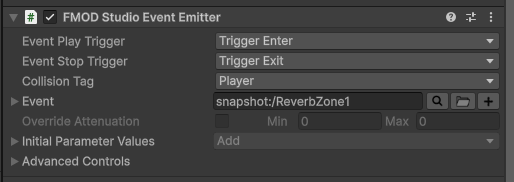
- Event play/stop to trigger enter/exit
- Collision Tag: Player
- Event: Click the magnifying glass and scroll to the bottom folder where it says “Snapshots”, select an
appropriate reverb zone style.
Note: Be sure colliders don't overlap.