¶ Github & Unity
Unity Version: 6000.2.15f1 (https://unity.com/releases/editor/archive)
GitHub Desktop: https://desktop.github.com/download/ You will need to send me your username so I can whitelist you as a contributor
First Steps:
- Download Unity Hub. Technically optional but HIGHLY recommended.
- Download Unity Version seen above
- Create a GitHub Account
- Send your username to Quinn Hughes.
- Download GitHub Desktop and sign in. Wait until you're whitelisted to continue with the next steps
Second Steps:
- Accept the invitation to collaborate on GitHub.
- Get the repository. Use the options Clone repository from internet > from URL > https://github.com/QuinnH3333/FriendlyFire > it will create its own folder named "FriendlyFire" in your drive so pick where it goes.
- Open Unity Hub > Projects tab > add project from disk > Locate FriendlyFire folder
- Brush up on Git terms and Branches workflow, and you're off!
¶ Git Terms
Repository/Repo - The "shared drive" type container for a project
Origin - The online repo we share
Local - Your version of the repo, can be out of date
Commit - Saves your work locally
Stash - Save unfinished work for later
Fetch - Views changes from origin
Pull - Grabs and applies changes (Fetch and Pull are different, but GitDesktop uses them sorta interchangeably)
Push - Sends your commits to the origin repo
Branch - A separate version of the repo that doesn't affect the main branch
Main - Primary branch, the "official" version.
Rebase - Brings your branch up-to-date with another and moves all your commits on top
Merge - Combines two branches
Checkout - Sets your active current branch
¶ Branches
Branches Workflow video: https://youtu.be/5yXApG6YVwQ
Steps for making a commit on your own branch:
- Commit all changes
- Fetch/pull Origin
- Branch > Rebase current branch > Select Main Branch, sort out any conflicts here (this updates your branch with anything in main)
- Push branch to Origin
(If you don't do this specifically in this order, you will be working on an outdated branch. Also, when you try to merge in your branch later, you'll get some scary dialogue boxes.)
Steps for merging a branch:
- Start on your current branch. Commit all changes, fetch
- Create a safety branch based on your branch with all the changes
- Branch > Rebase current branch > Main, sort out any conflicts here
- Push
- Checkout Main, on main branch, select Branch > Merge into current branch > your branch
- Check that the merge was successful, then delete all branches you're not working on
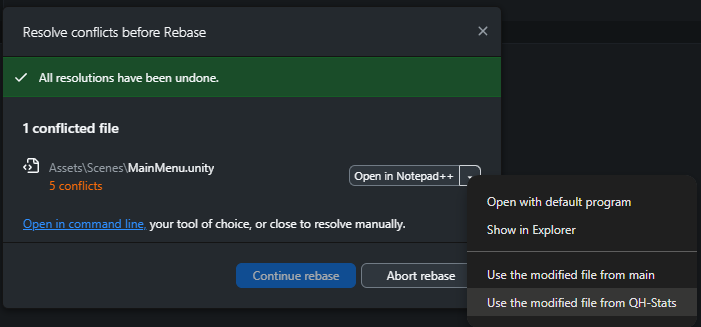
Steps for resolving a conflict:
- Know which file has been changed, and which version you'd like to keep
- In the dialogue box, click the dropdown (yours might have a different title)
- Select either “Use the modified file from …” and hit Continue rebase
(Just know that it will overwrite the file on whatever branch is being updated. Since I'm rebasing my branch the overwrite will affect my branch, not Main. When I merge my branch into Main it will overwrite the file in
Main because that is the branch getting updated.)
¶ FAQs
¶ Why branches?
Keeps the problems off the main branch and lets multiple people work on the same project at once.
¶ How often should I merge my branch into main?
Task-oriented. Merge ONLY when you've fixed anything you broke and when your task is done. This should probably be once a week, give or take a few days.
¶ Can I merge into main and keep working on my branch?
Yes! Although I didn't show it, you can. I'd recommend deleting your safety branch once you're certain everything merged correctly. If Main is updated with more stuff after you merge, do rebase your branch!
¶ What's the workflow again?
Create a branch, make changes, commit changes, rebase the branch to main, test in Unity and solve any conflicts, push, and rebase branch into Main. Commit, pull, push.
¶ Git LFS
Git LFS allows repositories to handle large files without rejecting them. There is a limit to how big a file can be when passed around. This is NOT an optional install, and ANY computer you'll be using needs this to be installed to function correctly.
¶ Verifying Install
- In the bottom left corner, click the Windows icon and use the “search programs and files” search bar to find a program called Git Bash
- Open Git Bash and type in “ git lfs version ” .
- If the console outputs a response similar to the line below, you're good!
git-lfs/3.7.1 (GitHub; windows amd64; go 1.25.1; git b84b3384 - (Optional) If old files are now being tracked with Git LFS, type in “ git lfs pull ”
¶ Git Bash Not Found
This is due to you not having Git itself installed (GitHub Desktop is NOT Git)
- Visit this link and click the Git for Windows/x64 Setup
- Once downloaded, run the setup wizard. For almost everything, you can take the default settings
- Select Components: Be sure Git LFS has a blue checkmark and will be installed
- Initial Branch Name: (Optional) Switch to Override and use “main” as your initial branch name
- Once the wizard finishes its installation, repeat the steps in Verifying Install
¶ Git LFS Not Installed
- In the bottom left corner, click the Windows icon and use the “search programs and files” search bar to find a program called Git CMD (if this doesn't come up, follow the steps above)
- Open Git CMD and type in “ git lfs install ”
- Repeat the steps in Verifying Install.
¶ Tracking Files with Git LFS
Only one person needs to go through these steps, so pick whoever is most confident in their git-juitsu.
- Verify the large file types that are bogging down your project, take note of their file extensions. Commonly tracked extensions: “*.dll” “*.mp4” “*.psd” “*.fbx”
- Check if you're tracking the .gitattributes file in your repository already (you probably are if working on a team). If not, use this in git bash "git add .gitattributes"
- Open Git Bash and type in " git lfs track "*.psd" " while swapping the file extension for your particular needs. Repeat for each extension.
- (Optional) If you want old files to be migrated to git lfs then also run " git lfs migrate import --include="*.dll,*.psd" " again, swapping in your extensions.
- Commit and push the new updates: git commit -m "Configure Git LFS tracking" and git push (if you have GitHub Desktop, you can see the staged changes, assure they're checked, then commit and push like normal without git bash)
- Be sure ALL teammates who touch the repository have git LFS installed. If old files were migrated in step 4, have each member run “ git lfs pull ” in Git Bash during the verify install.